iPrompti
HomeCategoriesCommunity

✦ Prompt Detail

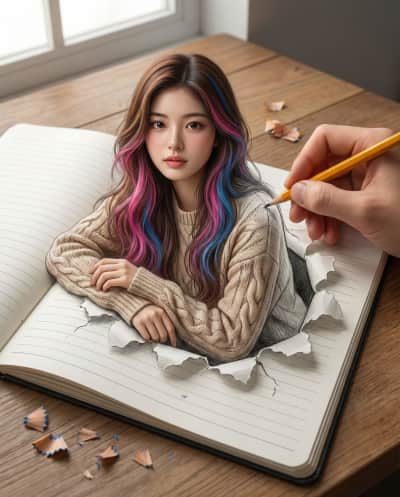
Drawn to Life

Posted April 20, 2026
✦ Copyable Prompt

Use the uploaded photo as a face reference and create a hyper-realistic 3D anamorphic optical illusion artwork featuring a beautiful young Asian woman emerging from an open-lined notebook. She has long, wavy brown hair with distinct, vibrant pink and blue highlights and is wearing a cozy beige cable-knit sweater. She appears to be popping out of the paper from the waist up, with a torn paper effect, leaning her arms and steadying herself naturally on the ripped paper edges. To blur the line between 2D sketch and 3D reality, include a real human hand holding a yellow pencil, actively sketching her shoulder. The notebook rests on a wooden table. Use a high-angle, top-down shot with cinematic lighting—soft studio lighting on the subject and natural lighting on the desk—rendered in 8k resolution with photorealistic skin texture and intricate details. Aspect ratio 4:5

Share this prompt
✦ Model or Tool
ChatGPT
✦ Tags
ArtworkDrawing/SketchFantasyIllustrationPortraits

✦ Prompting Guide

Usage Guide & Styling Tips for "Drawn to Life"

This prompt is engineered specifically for Artwork style transformations. Every prompt in the iPrompti library is pre-tested across multiple lighting environments and photo subjects to ensure high-fidelity outputs in Google Gemini, ChatGPT (DALL·E 3), and Midjourney without requiring complex manual prompt re-writing.

Result & Styling

The "Drawn to Life" prompt is engineered to generate a unique visual styling. Outputs a high-fidelity creative transformation featuring vivid color accuracy, sharp detail definitions, and optimized highlight-shadow balance. It boosts detail clarity while retaining natural lighting. It works by combining advanced lighting tags, color science parameters, and composition formulas specific to Artwork styles. When processed by Gemini/ChatGPT, it optimizes contrast ratios and applies professional color grading to deliver a polished, premium aesthetic that stands out on any feed.

Best Reference Photo

For the absolute best results with "Drawn to Life", your reference photo choice is critical. Works well with any clear, high-resolution portrait or subject photo that has defined contours and balanced exposure. Avoid low-resolution or blurry uploads. High-contrast, sharp subject definitions, and clear directional lighting enable the generative model to map textures and features accurately. Avoid photos with motion blur, extreme angles, or poor lighting, as they degrade the final styling application.

Pro Prompting Tips

  • Ensure your reference image has sharp focus on the eyes; this helps the AI model keep the facial structure consistent.
  • For enhanced depth, specify a particular camera lens (e.g., 85mm f/1.4 or 35mm) to guide the generator's depth of field.
  • To customize this prompt in Gemini or ChatGPT, keep the core styling tags intact but swap background details to fit your desired aesthetic.

Common Mistakes to Avoid

  • Uploading low-resolution or heavily compressed photos, which forces the AI to guess features, causing distorted faces or limbs.
  • Altering the core camera parameters in the prompt, which can break the specific film tone and grain consistency.

Prompt Anatomy

This prompt is structured around a clear Subject, an Aesthetic Style, specific Lighting Instructions, and Camera settings to ensure consistent AI generation.

Recommended Settings

Aspect Ratio: 16:9 or 9:16 (for social). Model: Midjourney v6 / DALL·E 3 / Gemini Advanced. Stylize: Medium/High.

✦ Quality Signal

Ratings & Reviews

Crowdsourced ratings and real user results for "Drawn to Life".

Rate & Review this Prompt

Select rating
0/300

Community Reviews (0)

Sort by:
Loading reviews...

✦ Similar Styles

Related Prompts

✦ Browse

Explore More Categories