

iPrompti
HomeCategoriesCommunity

✦ Prompt Detail

Immersive Setup

Posted April 20, 2026
✦ Copyable Prompt

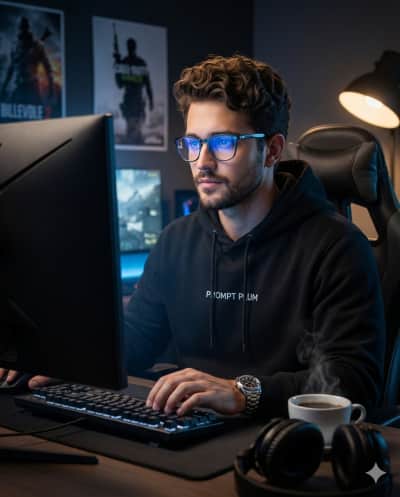
Transform the uploaded photo into an ultra-realistic, hyper-detailed cinematic photograph with DSLR quality, rendered in 32K resolution, with a 4:5 vertical aspect ratio. 🔒 Identity & Face Preservation (Very Important) The subject’s face must remain 100% identical to the reference image. Strictly preserve: Facial structure Bone geometry & proportions Skin tone & natural texture Eye shape, nose, jawline Hairline, beard pattern (if present) Expression & overall identity No beautification, reshaping, stylization, smoothing, or identity drift. 👤 Subject A handsome young man fully immersed in a gaming session. His expression is focused, calm, and intense, with natural skin texture, visible pores, and realistic facial detail. He is seated upright, typing on a keyboard and looking directly at the glowing screen. 💡 Lighting Primary light: the gaming monitor in front of him, casting a cool blue glow on his face and glasses Secondary light: a warm desk lamp from the side, creating soft rim light and depth Cinematic contrast with realistic shadows and subtle highlights 👕 Wardrobe & Accessories Black hoodie with “PROMPT PLUM” printed clearly on the chest Luxury metal wristwatch Modern blue-light glasses with subtle screen reflections 🖥 Environment A dimly lit, premium gaming workspace: Large gaming monitor in front Gaming chair Posters of popular video games on the wall behind him A cup of hot coffee on the desk with visible steam Headphones resting on the table The mood should feel immersive, modern, and cinematic. 🎬 Final Style Hyper-realistic textures (skin, fabric, glass, metal) Cinematic depth of field Editorial photography look Clean high contrast Natural lighting transitions Sharp focus with soft background blur Fully respect the original face and identity while transforming the scene into a cinematic, ultra-realistic gaming portrait.

Share this prompt
✦ Model or Tool
Gemini
✦ Tags
Coding & DeveloperGamingIllustrationPhotographyPortraitsProfessional Studio Setup

✦ Prompting Guide

Usage Guide & Styling Tips for "Immersive Setup"

This prompt is engineered specifically for Coding & Developer style transformations. Every prompt in the iPrompti library is pre-tested across multiple lighting environments and photo subjects to ensure high-fidelity outputs in Google Gemini, ChatGPT (DALL·E 3), and Midjourney without requiring complex manual prompt re-writing.

Result & Styling

The "Immersive Setup" prompt is engineered to generate a unique visual styling. Produces an aesthetically balanced visual with rich, natural textures, optimized light angles, and vibrant detail contrast that elevates the original composition. It works by combining advanced lighting tags, color science parameters, and composition formulas specific to Coding & Developer styles. When processed by Gemini/ChatGPT, it optimizes contrast ratios and applies professional color grading to deliver a polished, premium aesthetic that stands out on any feed.

Best Reference Photo

For the absolute best results with "Immersive Setup", your reference photo choice is critical. Best results are achieved with sharp, well-focused photos taken in ample natural light. Distinct outlines help the generator maintain detail fidelity. High-contrast, sharp subject definitions, and clear directional lighting enable the generative model to map textures and features accurately. Avoid photos with motion blur, extreme angles, or poor lighting, as they degrade the final styling application.

Pro Prompting Tips

  • Ensure your reference image has sharp focus on the eyes; this helps the AI model keep the facial structure consistent.
  • For enhanced depth, specify a particular camera lens (e.g., 85mm f/1.4 or 35mm) to guide the generator's depth of field.
  • If the colors feel too saturated, add keywords like 'muted color science' or 'pastel color palette' at the end of the prompt.

Common Mistakes to Avoid

  • Neglecting to check for negative prompt exclusions like 'deformed hands' or 'blurry details' in your generator settings.
  • Altering the core camera parameters in the prompt, which can break the specific film tone and grain consistency.

Prompt Anatomy

This prompt is structured around a clear Subject, an Aesthetic Style, specific Lighting Instructions, and Camera settings to ensure consistent AI generation.

Recommended Settings

Aspect Ratio: 16:9 or 9:16 (for social). Model: Midjourney v6 / DALL·E 3 / Gemini Advanced. Stylize: Medium/High.

✦ Quality Signal

Ratings & Reviews

Crowdsourced ratings and real user results for "Immersive Setup".

Rate & Review this Prompt

Select rating
0/300

Community Reviews (0)

Sort by:
Loading reviews...

✦ Similar Styles

Related Prompts

Coding & Developer

New

Immersive Setup

Transform the uploaded photo into an ultra-realistic, hyper-detailed cinematic photograph with DSLR quality, rendered in 32K resolution, with a 4:5 vertical aspect ratio. 🔒 Identity & Face Preservation (Very Important) The subject’s face must remain 100% identical to the reference image. Strictly preserve: Facial structure Bone geometry & proportions Skin tone & natural texture Eye shape, nose, jawline Hairline, beard pattern (if present) Expression & overall identity No beautification, reshaping, stylization, smoothing, or identity drift. 👤 Subject A handsome young man fully immersed in a gaming session. His expression is focused, calm, and intense, with natural skin texture, visible pores, and realistic facial detail. He is seated upright, typing on a keyboard and looking directly at the glowing screen. 💡 Lighting Primary light: the gaming monitor in front of him, casting a cool blue glow on his face and glasses Secondary light: a warm desk lamp from the side, creating soft rim light and depth Cinematic contrast with realistic shadows and subtle highlights 👕 Wardrobe & Accessories Black hoodie with “PROMPT PLUM” printed clearly on the chest Luxury metal wristwatch Modern blue-light glasses with subtle screen reflections 🖥 Environment A dimly lit, premium gaming workspace: Large gaming monitor in front Gaming chair Posters of popular video games on the wall behind him A cup of hot coffee on the desk with visible steam Headphones resting on the table The mood should feel immersive, modern, and cinematic. 🎬 Final Style Hyper-realistic textures (skin, fabric, glass, metal) Cinematic depth of field Editorial photography look Clean high contrast Natural lighting transitions Sharp focus with soft background blur Fully respect the original face and identity while transforming the scene into a cinematic, ultra-realistic gaming portrait.

Copy

By @iPrompti

✦ Browse

Explore More Categories