

iPrompti
HomeCategoriesCommunity

✦ Prompt Detail

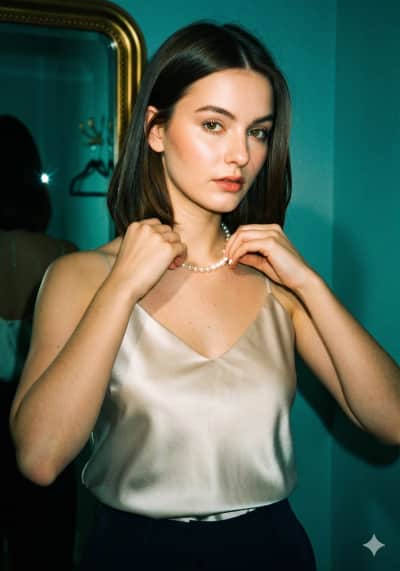
Instagram Flash Restyle

Posted August 23, 2026
✦ Copyable Prompt

Apply only an Instagram Flash filter-style effect to the uploaded image. Do not regenerate, redesign, crop, reframe, beautify, retouch, or change any content. Preserve the exact same person, face, expression, pose, outfit, hairstyle, objects, background, framing, and composition. Change only the filter treatment: night conversion, direct flash behavior, color grading, visible noise, and film grain. Convert the image into a darker night-like / low-light version of the same scene. Make the environment cooler, moodier, and richer, with a strong green-cyan / teal ambience and deeper night density, while keeping the original scene recognizable. The background should become darker and cooler than the subject, but not muddy or fully black. The subject treatment is critical: light the subject with a strong direct on-camera frontal flash that is clearly visible in the result. The flash must dominate the subject more than the ambient light. The face, skin, hair, and clothing facing the camera should look brighter, flatter, more directly flash-lit, and slightly lifted in exposure. The subject should appear more illuminated and more separated from the surroundings, like a real camera-flash snapshot, not a softly relit portrait. Keep the skin warm, bright, glowing, and flash-washed, while the surroundings stay cooler and darker. If reflective, glossy, metallic, leather, glass, polished, or shiny surfaces are present, show realistic small flash reflections / specular pops where appropriate. If the scene geometry naturally allows it, include a believable subtle hard-edged flash shadow behind the subject or nearby objects, but only where it would occur naturally. Match the overall look of a rich Instagram Flash-style photo: stronger night mood, cooler green-cyan ambience, brighter flash-lit subject, slightly punchier contrast, and a more obvious filtered look. Add visible digital noise and fine 35mm color-negative film grain across the whole image. Keep the noise and grain clearly visible, especially in darker areas, smooth surfaces, and the background. If the original image already contains noise or compression texture, do not clean it up — blend it naturally into the overall grain structure. The final result should look like the same original photo captured at night with a strong direct camera flash, featuring richer green-cyan ambience, a much more obviously flash-lit subject, visible film grain, visible noise, and a filtered Instagram Flash look. Avoid: soft studio lighting, weak flash on the subject, polished portrait lighting, over-clean denoising, overly neutral colors, dull flat skin, muddy blacks, or changing the image content.

Share this prompt
✦ Model or Tool
Gemini
✦ Tags

✦ Prompting Guide

Usage Guide & Styling Tips for "Instagram Flash Restyle"

This prompt is engineered specifically for Photo Restyle style transformations. Every prompt in the iPrompti library is pre-tested across multiple lighting environments and photo subjects to ensure high-fidelity outputs in Google Gemini, ChatGPT (DALL·E 3), and Midjourney without requiring complex manual prompt re-writing.

Result & Styling

The "Instagram Flash Restyle" prompt is engineered to generate a unique visual styling. Produces an aesthetically balanced visual with rich, natural textures, optimized light angles, and vibrant detail contrast that elevates the original composition. It works by combining advanced lighting tags, color science parameters, and composition formulas specific to Photo Restyle styles. When processed by Gemini/ChatGPT, it optimizes contrast ratios and applies professional color grading to deliver a polished, premium aesthetic that stands out on any feed.

Best Reference Photo

For the absolute best results with "Instagram Flash Restyle", your reference photo choice is critical. Works well with any clear, high-resolution portrait or subject photo that has defined contours and balanced exposure. Avoid low-resolution or blurry uploads. High-contrast, sharp subject definitions, and clear directional lighting enable the generative model to map textures and features accurately. Avoid photos with motion blur, extreme angles, or poor lighting, as they degrade the final styling application.

Pro Prompting Tips

  • If the colors feel too saturated, add keywords like 'muted color science' or 'pastel color palette' at the end of the prompt.
  • To customize this prompt in Gemini or ChatGPT, keep the core styling tags intact but swap background details to fit your desired aesthetic.
  • Pair this prompt with simple, structured outfits to avoid overly complex or distorted clothing folds in the final render.

Common Mistakes to Avoid

  • Uploading low-resolution or heavily compressed photos, which forces the AI to guess features, causing distorted faces or limbs.
  • Adding too many conflicting lighting terms (e.g., combining 'soft studio light' and 'harsh midday sun') which confuses the generator.

Prompt Anatomy

This prompt is structured around a clear Subject, an Aesthetic Style, specific Lighting Instructions, and Camera settings to ensure consistent AI generation.

Recommended Settings

Aspect Ratio: 16:9 or 9:16 (for social). Model: Midjourney v6 / DALL·E 3 / Gemini Advanced. Stylize: Medium/High.

✦ Quality Signal

Ratings & Reviews

Crowdsourced ratings and real user results for "Instagram Flash Restyle".

Rate & Review this Prompt

Select rating
0/300

Community Reviews (0)

Sort by:
Loading reviews...

✦ Similar Styles

Related Prompts

Photo Restyle

New

Instagram Flash Restyle

Apply only an Instagram Flash filter-style effect to the uploaded image. Do not regenerate, redesign, crop, reframe, beautify, retouch, or change any content. Preserve the exact same person, face, expression, pose, outfit, hairstyle, objects, background, framing, and composition. Change only the filter treatment: night conversion, direct flash behavior, color grading, visible noise, and film grain. Convert the image into a darker night-like / low-light version of the same scene. Make the environment cooler, moodier, and richer, with a strong green-cyan / teal ambience and deeper night density, while keeping the original scene recognizable. The background should become darker and cooler than the subject, but not muddy or fully black. The subject treatment is critical: light the subject with a strong direct on-camera frontal flash that is clearly visible in the result. The flash must dominate the subject more than the ambient light. The face, skin, hair, and clothing facing the camera should look brighter, flatter, more directly flash-lit, and slightly lifted in exposure. The subject should appear more illuminated and more separated from the surroundings, like a real camera-flash snapshot, not a softly relit portrait. Keep the skin warm, bright, glowing, and flash-washed, while the surroundings stay cooler and darker. If reflective, glossy, metallic, leather, glass, polished, or shiny surfaces are present, show realistic small flash reflections / specular pops where appropriate. If the scene geometry naturally allows it, include a believable subtle hard-edged flash shadow behind the subject or nearby objects, but only where it would occur naturally. Match the overall look of a rich Instagram Flash-style photo: stronger night mood, cooler green-cyan ambience, brighter flash-lit subject, slightly punchier contrast, and a more obvious filtered look. Add visible digital noise and fine 35mm color-negative film grain across the whole image. Keep the noise and grain clearly visible, especially in darker areas, smooth surfaces, and the background. If the original image already contains noise or compression texture, do not clean it up — blend it naturally into the overall grain structure. The final result should look like the same original photo captured at night with a strong direct camera flash, featuring richer green-cyan ambience, a much more obviously flash-lit subject, visible film grain, visible noise, and a filtered Instagram Flash look. Avoid: soft studio lighting, weak flash on the subject, polished portrait lighting, over-clean denoising, overly neutral colors, dull flat skin, muddy blacks, or changing the image content.

Copy

By @iPrompti

Photo Restyle

New

Cinematic Night Glow Restyle

Use the uploaded image as the main base image and preserve the subject’s original pose, framing, composition, camera angle, crop, body position, hand placement, facial identity, hairstyle, clothing, accessories, and overall subject details. Keep the aspect ratio the same as the original image. Do not change the pose or expression. Only transform the lighting, background mood, and atmosphere. Convert the scene into a dark, moody nighttime portrait with a deep muted background fading into near-black shadows. Replace the original background with a soft, out-of-focus night environment featuring faint silhouettes, subtle bokeh lights, and cinematic dusk-to-night tones. Add a strong backlight directly behind the subject to create a bright white rim light around the hair, shoulders, arms, hands, clothing edges, and full body outline. Add a soft luminous bloom aura around the subject, especially around the outer edges, to create a dreamy glowing silhouette effect. The glow should feel natural, atmospheric, and cinematic, not overly artificial or neon. Keep the subject clearly visible while allowing the background to remain dark and subdued. Maintain realistic skin texture, realistic clothing texture, and natural facial features. The final image should feel like an ultra-realistic editorial night portrait shot with an 85mm DSLR lens using soft flash diffusion, with shallow depth of field, subtle halation, bloom glow, gentle flash-lit contrast, and a dreamy low-light atmosphere. Style keywords: cinematic rim light, glowing body aura, halation effect, bloom glow, dreamy silhouette glow, moody night portrait, soft flash diffusion, dusk bokeh background, CCD camera aesthetic, disposable flash mood, Instagram lofi night tones, shallow depth of field, photorealistic, ultra-detailed, 4K.

Copy

By @iPrompti

✦ Browse

Explore More Categories