iPrompti
HomeCategoriesCommunity

✦ Prompt Detail

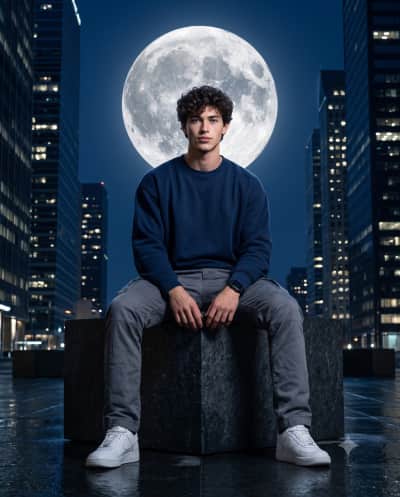
Urban Eclipse

Posted August 23, 2026
✦ Copyable Prompt

Create a hyper-realistic cinematic night portrait of a man seated confidently on a large dark stone block in a modern city skyline. He has a neatly styled, well-groomed appearance, wearing an oversized navy blue sweatshirt, gray cargo pants, white sneakers, and a black smartwatch. He sits with legs spread naturally, both hand relaxed between his legs, looking directly at the camera with a calm, confident expression. A massive detailed full moon is perfectly positioned behind his head, creating a dramatic silhouette effect. Tall illuminated skyscrapers rise on both sides in the background, deep navy blue night sky, wet reflective ground, moody urban atmosphere, cinematic lighting, realistic skin and fabric textures, dramatic low-angle composition, eye-level subject gaze, centered framing, shallow depth of field, ultra-detailed, photorealistic, 8K resolution, 85mm lens, f/1.6, cinematic color grading. Aspect ratio 4:5.

Share this prompt
✦ Model or Tool
Gemini
✦ Tags

✦ Prompting Guide

Usage Guide & Styling Tips for "Urban Eclipse"

This prompt is engineered specifically for Conceptual Photography style transformations. Every prompt in the iPrompti library is pre-tested across multiple lighting environments and photo subjects to ensure high-fidelity outputs in Google Gemini, ChatGPT (DALL·E 3), and Midjourney without requiring complex manual prompt re-writing.

Result & Styling

The "Urban Eclipse" prompt is engineered to generate a unique visual styling. Produces an aesthetically balanced visual with rich, natural textures, optimized light angles, and vibrant detail contrast that elevates the original composition. It works by combining advanced lighting tags, color science parameters, and composition formulas specific to Conceptual Photography styles. When processed by Gemini/ChatGPT, it optimizes contrast ratios and applies professional color grading to deliver a polished, premium aesthetic that stands out on any feed.

Best Reference Photo

For the absolute best results with "Urban Eclipse", your reference photo choice is critical. Best results are achieved with sharp, well-focused photos taken in ample natural light. Distinct outlines help the generator maintain detail fidelity. High-contrast, sharp subject definitions, and clear directional lighting enable the generative model to map textures and features accurately. Avoid photos with motion blur, extreme angles, or poor lighting, as they degrade the final styling application.

Pro Prompting Tips

  • If the colors feel too saturated, add keywords like 'muted color science' or 'pastel color palette' at the end of the prompt.
  • Pair this prompt with simple, structured outfits to avoid overly complex or distorted clothing folds in the final render.
  • When using Midjourney, use the '--stylize' parameter to increase or decrease the artistic expression of this styling prompt.

Common Mistakes to Avoid

  • Altering the core camera parameters in the prompt, which can break the specific film tone and grain consistency.
  • Adding too many conflicting lighting terms (e.g., combining 'soft studio light' and 'harsh midday sun') which confuses the generator.

Prompt Anatomy

This prompt is structured around a clear Subject, an Aesthetic Style, specific Lighting Instructions, and Camera settings to ensure consistent AI generation.

Recommended Settings

Aspect Ratio: 16:9 or 9:16 (for social). Model: Midjourney v6 / DALL·E 3 / Gemini Advanced. Stylize: Medium/High.

✦ Quality Signal

Ratings & Reviews

Crowdsourced ratings and real user results for "Urban Eclipse".

Rate & Review this Prompt

Select rating
0/300

Community Reviews (0)

Sort by:
Loading reviews...

✦ Similar Styles

Related Prompts

Conceptual Photography

New

The Stages of Life

Create an ultra photorealistic, cinematic 8K portrait (1:1 Square) showing a single male identity evolving across five life stages in a precise diagonal panel composition. Core Composition & Crucial Alignment: Divide the image into five clean, parallel diagonal panels (lines slanting upwards from bottom-left to top-right: / / / / /). Ascending "Staircase" Placement (CRITICAL): The subjects' heads must NOT be on the same horizontal line. They must be vertically staggered in an ascending order. The child in the first panel (far left) must be placed lowest in the frame. Moving left to right, each subsequent older stage must be positioned progressively higher in the frame, ending with the elderly man in the final panel (far right) positioned the highest. Use sharp, crisp edges (no blur or gradient transitions) for the panel dividers. The layout must feel geometrically precise with consistent spacing and angles. Use the uploaded image as the ONLY reference. Maintain identical facial structure, proportions, and features across all ages. Only natural ageing changes (skin texture, wrinkles, hair) are allowed. No identity drift. Life Stages (Left to Right, Lowest to Highest positioning): Child (6–8): soft smile, pastel t-shirt, short tousled hair, smooth skin (Positioned lowest in the frame) Teen (14–17): confident, hoodie (muted tones), thicker hair, youthful texture (Positioned slightly higher) Young Adult (22–28): composed, blazer + plain shirt, well-groomed hair (Positioned in the middle) Middle Age (38–45): calm, formal shirt, slight hair recession, light wrinkles (Positioned higher) Elderly (70+): gentle smile, knit/formal wear, grey hair, detailed wrinkles (Positioned highest in the frame) Environment & Lighting: Dark charcoal studio background with subtle vignette. Cinematic lighting: soft frontal key light, strong rim light for separation, minimal fill. Lighting direction must stay consistent across all panels. Camera & Quality: Eye-level shot, 85mm lens, shallow depth of field, eyes in sharp focus. Extreme photorealism with visible pores, natural imperfections, detailed hair strands, and realistic fabric textures. Post & Constraints: Cinematic color grading (warm highlights, cool shadows), minimal retouching. No stylization, no distortion, no identity drift, no background clutter — clean studio only.

Copy

By @iPrompti

✦ Browse

Explore More Categories